A few weeks ago I was staring at a table in a planning doc, watching Claude break the same rule for what felt like the hundredth time.
The rule was simple. In our workflow, every row in a task-breakdown table has to be a one-sentence outcome statement - what independently-shippable piece exists when this row is done - and nothing else. No method names. No file paths. No "and" gluing two deliverables together. No little parenthetical lists of sub-items. All of that detail belongs in a separate "Information Gathered" section, referred to by name.
It's not a subtle rule. It's written in our CLAUDE.md. It's written in the workflow spec. I had, at one low point, also written it into Claude's long-term memory. I had practically tattooed it.
And Claude knew it. If I asked, it could recite the rule back to me, explain the rationale, even cite where it lived. Then it would turn around and write me a row like:
Migrate the coordinator onto the new bus (self-bounce, re-entrancy, and sender identification) via the typed subscription API so duplicate events no longer fire.
Reader, that is four rule violations in one sentence wearing a trench coat.

So I did what most of us do. I added more instructions. I made the memory note longer. I added examples of good rows and bad rows. It helped a little. Then context would grow, a complex task would shift Claude's attention, and the drift would quietly come back.
That's when it finally clicked - and it's the same realization the rest of this post is about:
The problem was not memory. It was not prompting either. I was relying on a probabilistic system to behave deterministically.
This is exactly the gap that Claude Code hooks are built to fill.
Why hooks exist at all
Claude can remember things, and Claude can follow structured guidance. That gets you surprisingly far. You write down how you want it to behave, and a lot of the time it does precisely that.
But Claude is an LLM, and LLMs are probabilistic. At every step it's deciding what to do next based on context, patterns, and trade-offs. Even when it "knows" a rule, applying that rule at the right moment is still a decision - not a guarantee.
That difference sounds academic until it costs you a re-commit. There is a real, load-bearing gap between:
- a system that usually behaves correctly, and
- a system where certain things always happen.
Anthropic's own docs are explicit about this: hooks introduce deterministic control at specific points in the lifecycle, instead of relying on the model to remember or prioritise the right behaviour.
Here's the part that took me embarrassingly long to internalise. When I finally root-caused my breakdown-rule problem, the failure wasn't comprehension. Claude understood the rule perfectly. The failure was misaligned writing motivation at the moment of writing the row. When drafting, the implicit question in its "head" was "what will this task do?" - which naturally produces a description of work. The rule wanted a different question: "what finished, independently-shippable piece exists here?" - which produces a clean noun phrase. And under review pressure from our GPT reviewer, padding the row to demonstrate understanding felt more valuable than leaving it sparse.
In other words: the drift fired at the write moment. So re-reading the rule - which happens at the recall moment - was a checkpoint at the wrong time. I was leaving the umbrella by the door and wondering why I kept getting rained on three streets away.
My first real fix was a four-step checklist that I made Claude walk for every row, before saving it. That helped a lot more than any amount of "please remember the rule," precisely because it intervened at the right moment.
But a checklist in a memory file still has a fatal flaw: it depends on the model choosing to run it. It's an instruction about when to be careful. It is, itself, probabilistic.
A hook is not. A hook is the umbrella, bolted to the doorframe, that won't let you leave without it.
What hooks are, in one clean mental model
Think of Claude as moving through a sequence of steps - a lifecycle. A prompt is submitted. Tools are called. Files are edited. A response is produced. A task is marked complete. Context gets compacted when the conversation grows too long.
Each of those moments is an event. Hooks let you attach logic to those events.
Take a rule everyone has wanted at some point:
"After code changes, the README must be updated."
You could write that in CLAUDE.md. But now you're back to relying on the model to remember and prioritise it - sometimes it will, sometimes it won't, especially as the session gets long and busy.
What you actually want is: when the event "code was edited" happens, an action is guaranteed to fire. Not "the model will probably remember." Will.
That's the whole mental shift. Hooks aren't memory and they aren't guidance. They're lifecycle control points - explicit moments where the system can enforce, validate, or react, no judgement required.
The events that matter most in practice
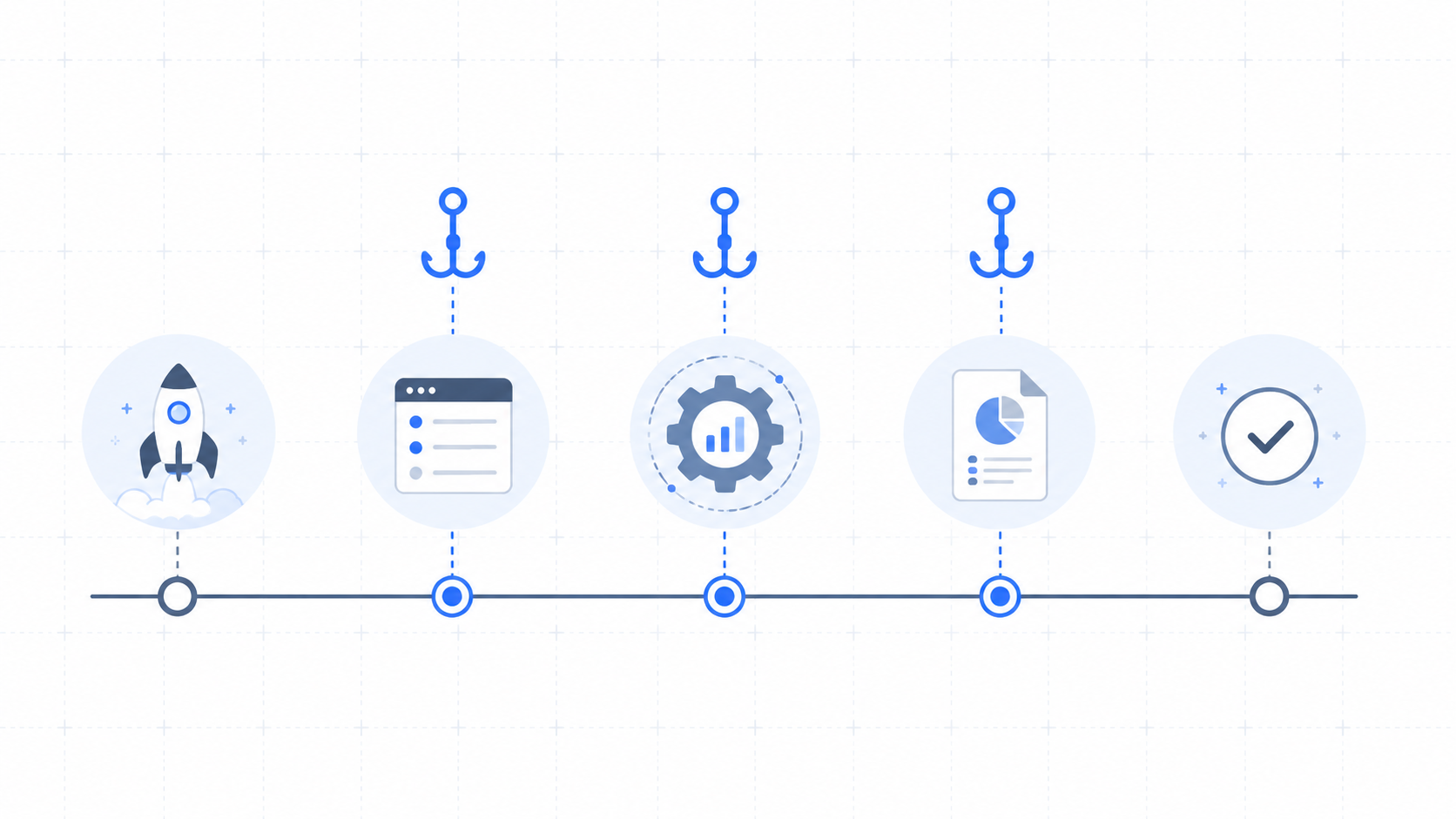
Anthropic publishes a full lifecycle diagram with a lot of events. You do not need to memorise the table. I find it far easier to group them into five moments:
- when a session starts or context changes
- before an action happens
- while something is running
- after something happens
- when work is about to be considered "done"
Once you think this way, the question stops being "which event do I use?" and becomes the much better question: "at what point in the workflow do I want to intervene?"
The five events worth knowing first:
- SessionStart - initialise context, and (crucially for me) react when context gets recompacted
- PreToolUse - intercept and control an action before it happens
- PostToolUse - react immediately after an action
- Stop - enforce checks before the response completes
- TaskCompleted - enforce a stricter definition of "done"
Those five cover the overwhelming majority of real workflows: guardrails, validation, quality control, and context management. Everything else tends to be either supporting behaviour (notifications, logging) or genuinely advanced (multi-agent coordination, MCP calls).
And notice: even for the README rule, there's no single "correct" event. PostToolUse checks right after each edit. Stop does a final pass before the response returns. TaskCompleted bakes it into the definition of done. Same rule, three different behaviours.
Hooks aren't just about what you enforce. They're about when.
How hooks actually work, technically
Under the hood, a hook is refreshingly simple:
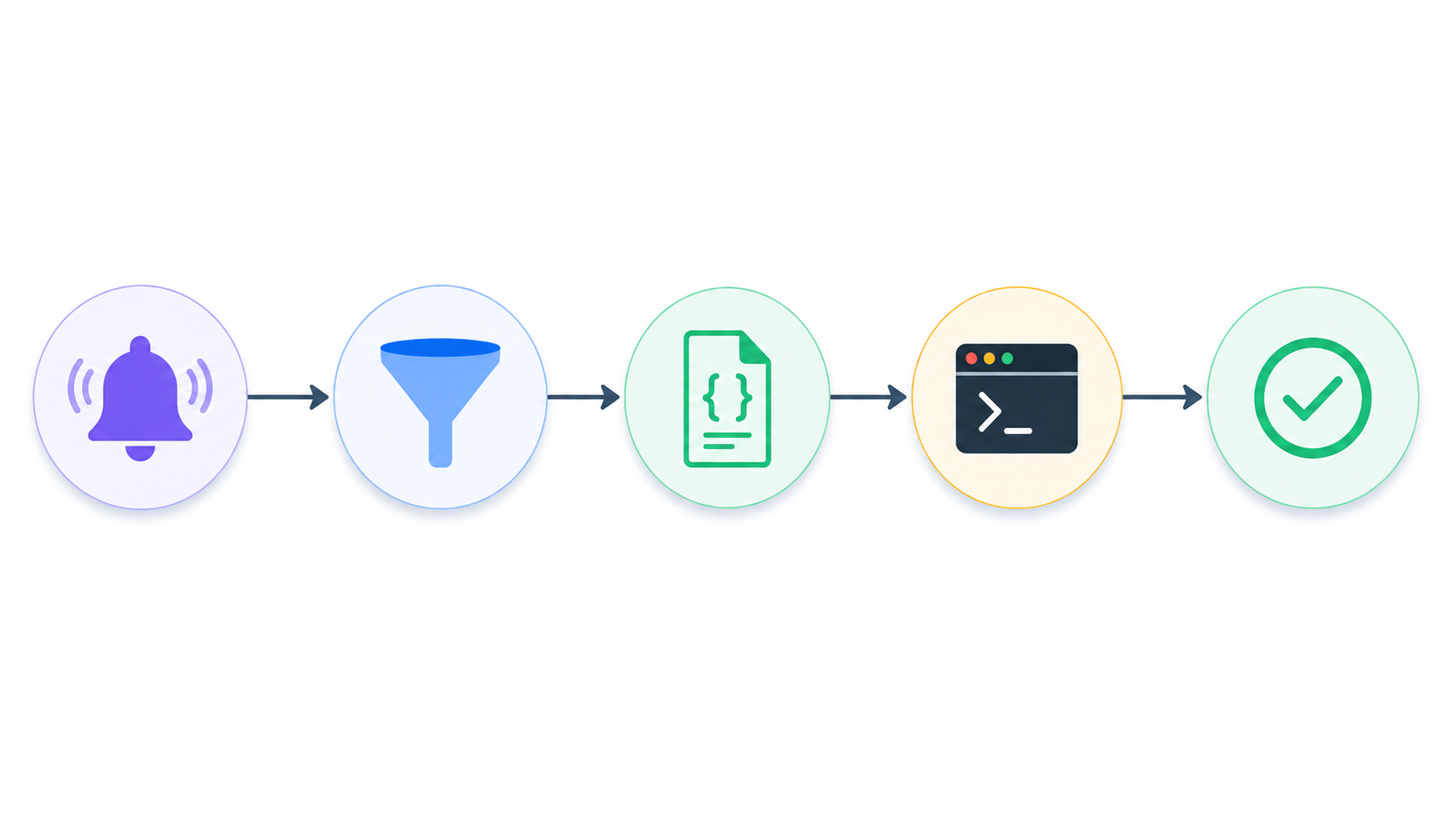
event → matcher → structured input → handler → outcome
A hook fires on an event, can be narrowed by a matcher, receives structured input describing what happened, and runs one or more handlers.
The smallest useful config looks like this:
{
  "hooks": {
    "PostToolUse": [
      {
        "matcher": "Edit|Write",
        "hooks": [
          {
            "type": "command",
            "command": "/path/to/check-readme-after-edit.sh"
          }
        ]
      }
    ]
  }
}
This listens for PostToolUse, filters it down to just the Edit and Write tools, and runs a shell script when that matches. Let's break down the three middle pieces.
The matcher
The matcher is how you stop a hook from firing constantly. For tool events (PreToolUse, PostToolUse), it's a regex tested against the tool name:
Edit|Write→ either toolBash→ only Bashmcp__.*→ MCP tools- no matcher → fire every time (and some events, like
StopandTaskCompleted, don't take matchers at all and always fire)
Matchers are what make a hook precise instead of noisy. A guardrail that fires on every single tool call is a guardrail you'll disable by Thursday.
The structured input
When a hook fires, Claude Code doesn't just say "hey, something happened." It hands your script a structured receipt of the event:
{
  "event": "PostToolUse",
  "tool_name": "Edit",
  "tool_input": {
    "file_path": "src/main.ts"
  }
}
This is why your handler doesn't have to scan the repo at random or guess what changed - it's reacting to a precise description of exactly what just happened.
The handler
Once event and matcher line up, a handler runs. There are four types:
- command → run a local script (most common, easiest to debug)
- http → ship the event to an external service (logging, Slack, an API)
- prompt → run an LLM-based check or transformation
- agent → delegate to another agent
Most hooks you'll meet in the wild are command hooks, because a small shell or Python script is plenty for the first wave of useful automation. But prompt and agent are where things get interesting - more on that in a second.
"Can't I just ask Claude to write my hooks?" Absolutely. I do. But knowing the structure still matters, because you need to review what it produced: Is it on the right event? Is the matcher too broad? Is it observing, blocking, or modifying? Does the handler inspect the right input? Is it safe to run on my machine? The real skill isn't typing JSON from memory - it's understanding the control surface well enough to read it critically.
Advanced hooks: when you want Claude to double-check itself
Command hooks are a great start, but they're a narrow slice of what hooks can do. Because hooks can run prompt and agent handlers, they can inject an extra layer of reasoning into your workflow.
There's a useful split here. Some checks are mechanical:
- "Did the README file change?"
- "Did the tests run?"
Scripts handle those perfectly. But many real checks are semantic:
- "Is the README actually up to date with the change?"
- "Does this implementation match what was originally asked?"
- "Is anything important missing before we call this done?"
That's where prompt and agent hooks earn their keep. You can wire in a checkpoint that effectively says: "Pause here, and think again before moving forward."
{
  "hooks": {
    "Stop": [
      {
        "hooks": [
          {
            "type": "agent",
            "prompt": "Check whether README.md reflects the recent code changes. If not, update it."
          }
        ]
      }
    ]
  }
}
At this point hooks stop feeling like developer tooling and start feeling like workflow design. You're deciding where the system should pause, where it should verify its own work, and where it should improve itself before moving on - and because they're tied to lifecycle events, those checks happen every time, not just when the model remembers.
Real examples from my own workflow
The reference posts you'll find online lean heavily on data-science examples. Mine come from a more ruthless place: a long-running, multi-developer trading-journal project where a single Claude session can run for hours through a structured, multi-stage workflow with its own skills, gates, and handoffs. When a session runs that long, "the model will remember" is not a plan. It's a prayer.
Here are four hooks that actually run in my setup.
1. The boring one that saves you anyway: tests on Stop
The classic, and still the one I'd never give up. On Stop (or TaskCompleted), run the quality gate:
{
  "hooks": {
    "Stop": [
      {
        "hooks": [
          {
            "type": "command",
            "command": "pnpm -F @enfomentis/web lint && pnpm -F @enfomentis/web type-check && pnpm sync-schema:check && pnpm -F @enfomentis/web test:run"
          }
        ]
      }
    ]
  }
}
Lint, type-check, a schema-hash check, and the unit suite. In my pre-hook life I forgot to run one of these roughly every other commit, and paid for it in follow-up commits with messages like "actually fix lint" and "ok actually this time." Now it's a side-effect of finishing, not a thing I have to remember.
2. Surviving amnesia: the active-skill marker on SessionStart
This is the one that made hooks click for me as a control layer, not a convenience.
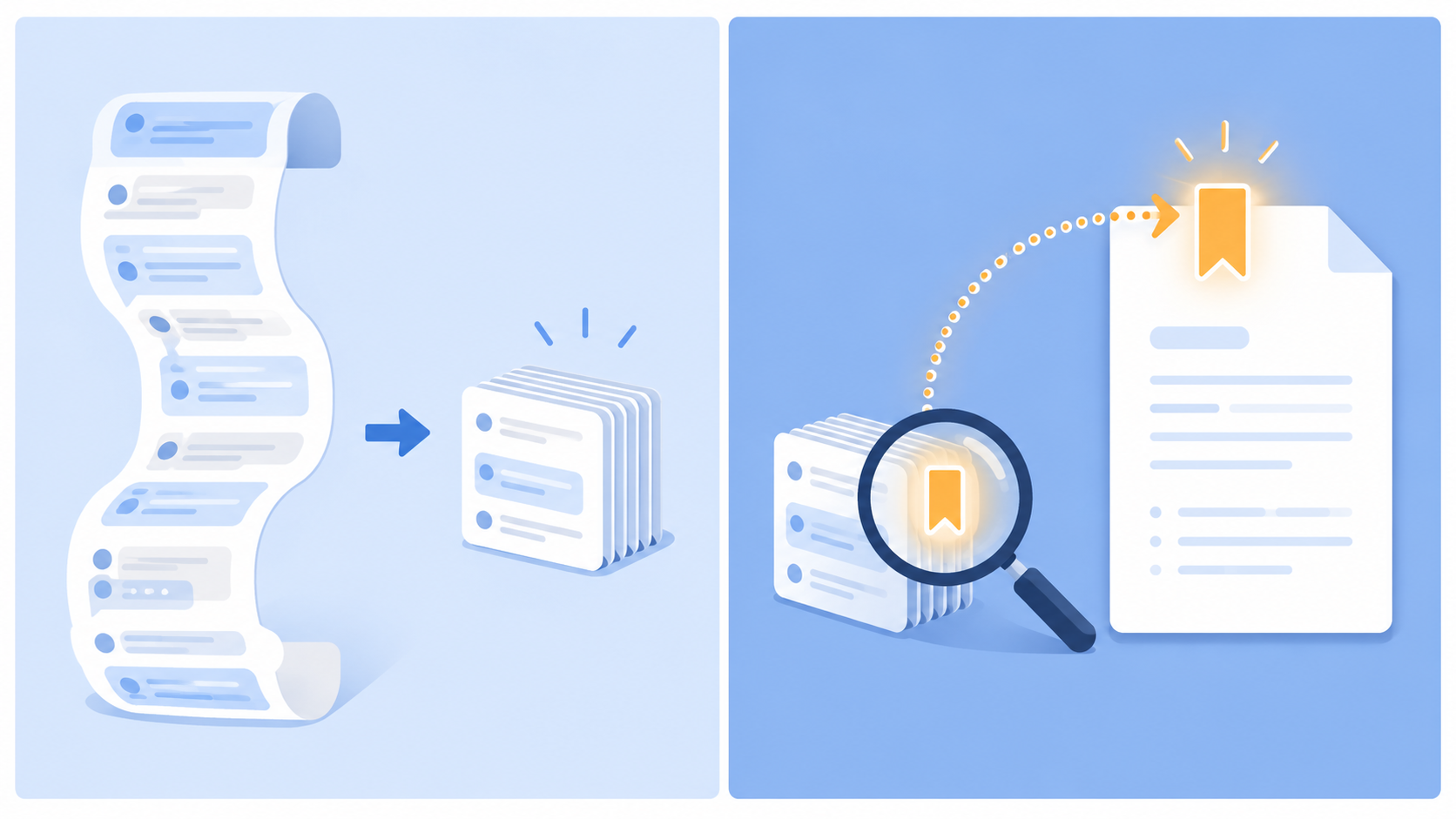
When a session gets long, the harness compacts the conversation to save context - useful, but it can drop the fact that I'm in the middle of a specific workflow skill. Claude effectively wakes up from a nap mid-sentence, slightly unsure what it was doing.
So: every response Claude writes begins with a literal marker line - [active-skill: phase], or [active-skill: none] when no skill is running. On its own that's just a label. The hook is what makes it matter. A SessionStart hook (matched specifically to the compact event) scans the recent transcript tail for the most recent marker, and re-injects the right skill's instructions as context for the next turn.
The label is the breadcrumb; the hook is the thing that follows the trail back. The model doesn't have to remember which skill it was in across a compaction - the hook reconstructs it deterministically.
3. The deterministic guardrail: a PreToolUse reorientation gate
Re-injecting the skill is good, but I wanted a guarantee that Claude wouldn't start editing files right after a compaction while it was still disoriented. This is where PreToolUse shines, because PreToolUse hooks can block an action.
{
  "hooks": {
    "PreToolUse": [
      {
        "matcher": "Edit|Write|MultiEdit|NotebookEdit|Bash|Task",
        "hooks": [
          {
            "type": "command",
            "command": "/path/to/reorientation-gate"
          }
        ]
      }
    ]
  }
}
After a compaction, this gate denies every mutating tool - Edit, Write, Bash, the lot - until Claude has re-read the active skill's required pointer files with the read-only Read tool. Read-side tools stay allowed, so it can reorient; it just can't change anything until it has. A companion hook watches for those required reads to complete and auto-releases the gate.
This is the cleanest illustration of the whole thesis I can give. The rule "re-read your context before you start editing after a compaction" is exactly the kind of thing the model knows and will mostly do. "Mostly" is how you corrupt a file with stale assumptions. The hook turns "mostly" into "always," and it does it by blocking at the precise moment the mistake would happen - PreToolUse, not "next time you remember."
(There's even an escape hatch: if the gate can't be satisfied legitimately, I can type a literal override token to release it. The hook only honours that token from a real human message - Claude can't self-release by writing the token itself. The control surface knows the difference between me granting permission and the model granting itself permission, which is a sentence I find quietly delightful.)
4. Enforcing house style: denying a tool on PreToolUse
Last one, and the smallest. In our workflow I want clarifying questions asked as plain text in chat, one at a time - not batched through the multiple-choice question tool. Telling Claude that in CLAUDE.md worked... mostly. (You're sensing a theme.)
So a PreToolUse matcher simply denies the AskUserQuestion tool unconditionally, with a deny message that restates the house rule. There's no "please remember to" anywhere. The capability is just gone, and the deny message teaches the right behaviour on the spot. It's the difference between a sign that says "please don't" and a door that doesn't open.
Closing thoughts
If you take one thing from this:
Hooks are not about telling the model what to do. They're about deciding when something must happen - and making it happen whether or not the model remembers.
My breakdown-rule saga taught me the principle the slow way. The rule was never the problem; the model understood it the whole time. The problem was that I kept trying to fix a write-moment failure with recall-moment tools - more instructions, longer memory notes, sterner phrasing - and a probabilistic system kept being, well, probabilistic. The checklist helped because it moved the intervention to the right moment. Hooks helped more because they removed the dependence on the model choosing to run the checklist at all.
Once you start thinking in lifecycle control points instead of instructions, behaviour stops depending on whether Claude "remembers" a rule, and your critical checks start happening exactly when they should - every time.
Hooks are not a niche feature. They're the missing layer between prompts and production: the place where behaviour stops being best-effort and starts being enforced.
Let me know if you have questions - and tell me about the rule you keep re-explaining to your agent. I guarantee there's a hook for it.